Are you wondering about recent wrong Trade Alerts and Closes?
What Caused the Odd Trade Alerts, and the Guards We Added
Over the last couple of days, some of you saw closing alerts that showed a large loss (in a few cases a -100% or -59% ROI) on trades that were actually winners. You were right to question it, and you should hear the full story from us, with the real numbers.
Start here, because it is the part that matters most:
No winning position was closed at a loss. Your trades and your capital were never at risk. The numbers on those few alerts were wrong, but the trades behind them were sound, and the issue is already fixed.
Why a real loss was never possible here
Every Maya trade is a defined-risk spread. The most a position can ever lose is the small, fixed amount you put in when you opened it, and that ceiling is set the moment you enter. A bad price on a screen can make a position look wrong for a moment. It cannot change what that position is actually worth, and it cannot create a loss the structure does not allow.
There is a second protection built into the math. A trade cannot truly be worth $0 while the stock is trading above the spread's buy strike, because it still holds real, built-in (intrinsic) value. An in-the-money winner being shown as a total loss is therefore not a market event. It is a data error, and we treat it as one.
What actually happened
We traced this fully to two causes that surfaced at the same time, and we understand both completely:
- A display error that printed the wrong number on the alert, showing some profitable trades as losers even though the position itself was fine.
- Bad data from the exchange. For brief moments, the exchange sent stale option quotes, in some cases a frozen $0 price. On a small number of trades, that bad quote led Maya to calculate a loss that was not real and send a closing alert.
On the small number of affected trades, the closing orders did not fill. The real market price was nowhere near the bad quote, so the orders never executed and the winning positions stayed open. You do not need to chase them or act on those alerts, because each one is being resent for you (more on that below). In one related case, a position in LMT opened and closed the same day on a stale quote, and because the spread held its real value it actually closed for a small profit (about $0.05 per spread), not a loss.
The affected orders are being resent
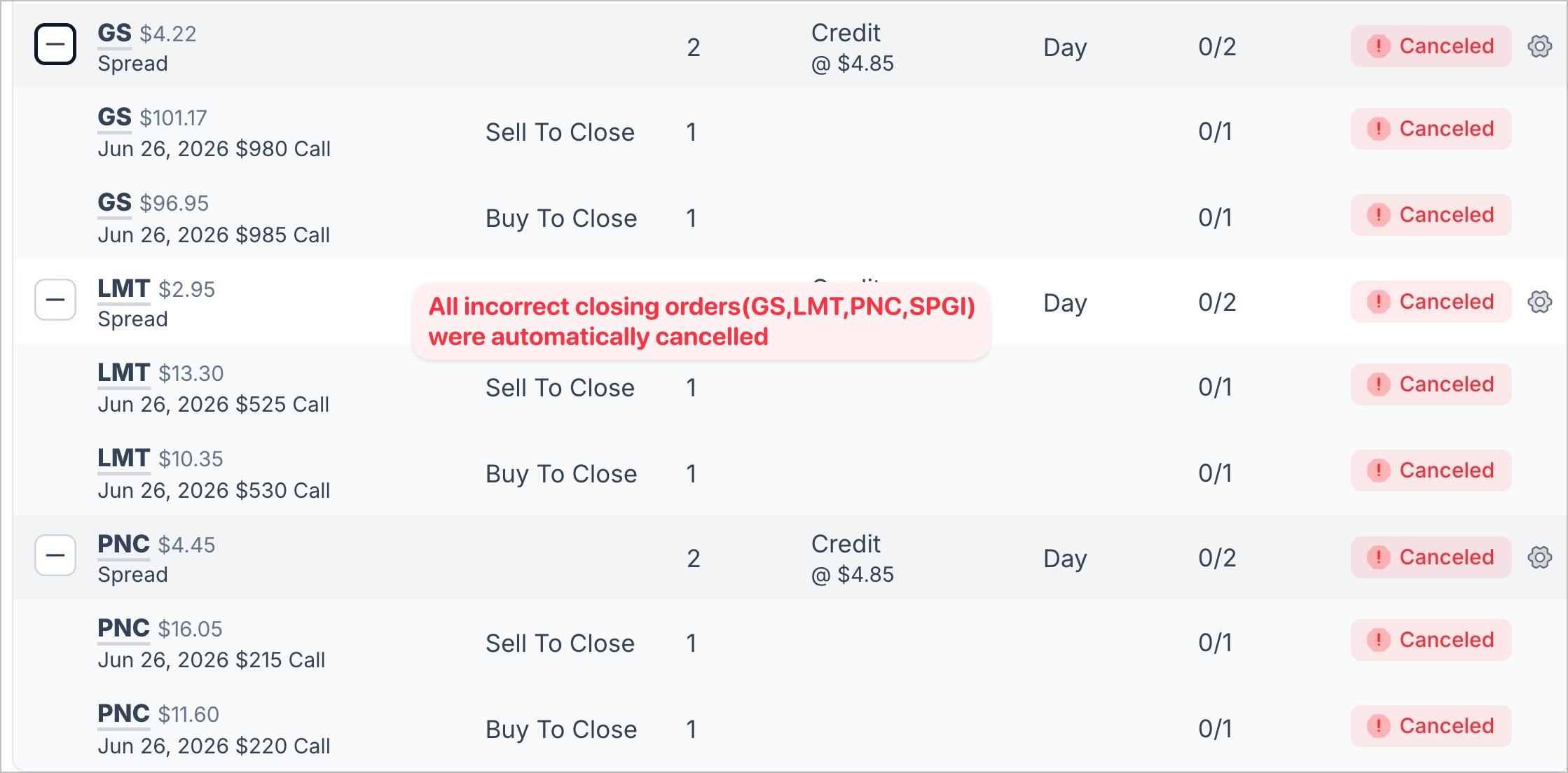
If you checked your brokerage, you may have seen several of these closing orders marked as Canceled with nothing filled (a status of 0/2). That is exactly what we would expect, and it is good news: it means the position is still open and still being managed for you.
You do not need to do anything. Every one of those orders is being resent automatically once the quotes are clean, and you will get a fresh closing alert when each one goes through. We are watching them in real time until they do.
What we changed so this cannot recur
The protections below now stand between a bad quote and your account. Each one independently would have stopped what you saw, and together they make a single bad tick a non-event.
| Safeguard | What it does for you |
|---|---|
| Intrinsic value floor | An in-the-money trade always holds its real, built-in value. With your stock above the strike, Maya will never price or sell it at $0. |
| Stale-quote detection | When the exchange sends a frozen or $0 price, Maya recognizes it as bad data and ignores it rather than acting on it. |
| Impossible-loss check | If a price implies a deep in-the-money winner is somehow a loss, Maya knows that cannot be true and holds the trade. |
| Two-look confirmation | Before closing for a loss, Maya waits and requires the same signal again minutes later, so one bad tick cannot trigger a close. |
| GTC closing orders | PeakBot now keeps every closing order working until it actually fills, so a close that misses on the first try still gets you out of the trade. |
| Live monitoring | Every open position is watched in real time while we work through the exchange data issues. |
One change deserves its own line, because it answers the natural worry behind all of this. A closing trade that does not fill can no longer leave you stuck in a position. PeakBot now places every closing order as a GTC (good-till-canceled) order, so the instruction stays working in the market until it gets you out, instead of expiring at the end of the day.
How to check your own trades
Open Maya's Spread Tracker on the website or at maya.peakbot.com and search for your trade. If Maya still shows it as open, the earlier close did not go through, and Maya is still managing it for you.
You are always in control
If a closing trade is still open by the Thursday or Friday of its expiration week, you are free to close it yourself. Every Maya trade is built to be out by the Wednesday of expiration week anyway, so closing it on your own at that point follows the same plan and does not interfere with the system.
Why we are telling you all of this
We could have corrected the numbers quietly and moved on. We do not run it that way. Every figure we publish is what the account actually did, and when something looks off, you will hear about it from us, in plain terms, with the cause and the fix. That is the same discipline behind the strategy itself: 0% emotions, 100% rules. The rules held through this, the defined-risk structure contained it, and the system is now hardened against it.
Thank you for trusting us with your trades, and thank you to those who flagged this. We are on it.
- Team Maya
https://tradewithmaya.com
0% Emotions, 100% Rules
Share this post
Comments 0
Leave a Comment
No comments yet. Be the first to comment!
Stay Updated
Subscribe to our newsletter for the latest trading insights and updates.
Autotrading is Live
Maya sends the signals. PeakBot submits the orders to your brokerage. You never lift a finger.
See How It Works